The File System Stack.
BoxLambda OS now supports file system access within its Forth environment. A layered stack of Forth modules provides the abstraction required for convenient, shell-level file operations.
Context
The diagram below illustrates the software architecture I am working towards for the BoxLambda OS.
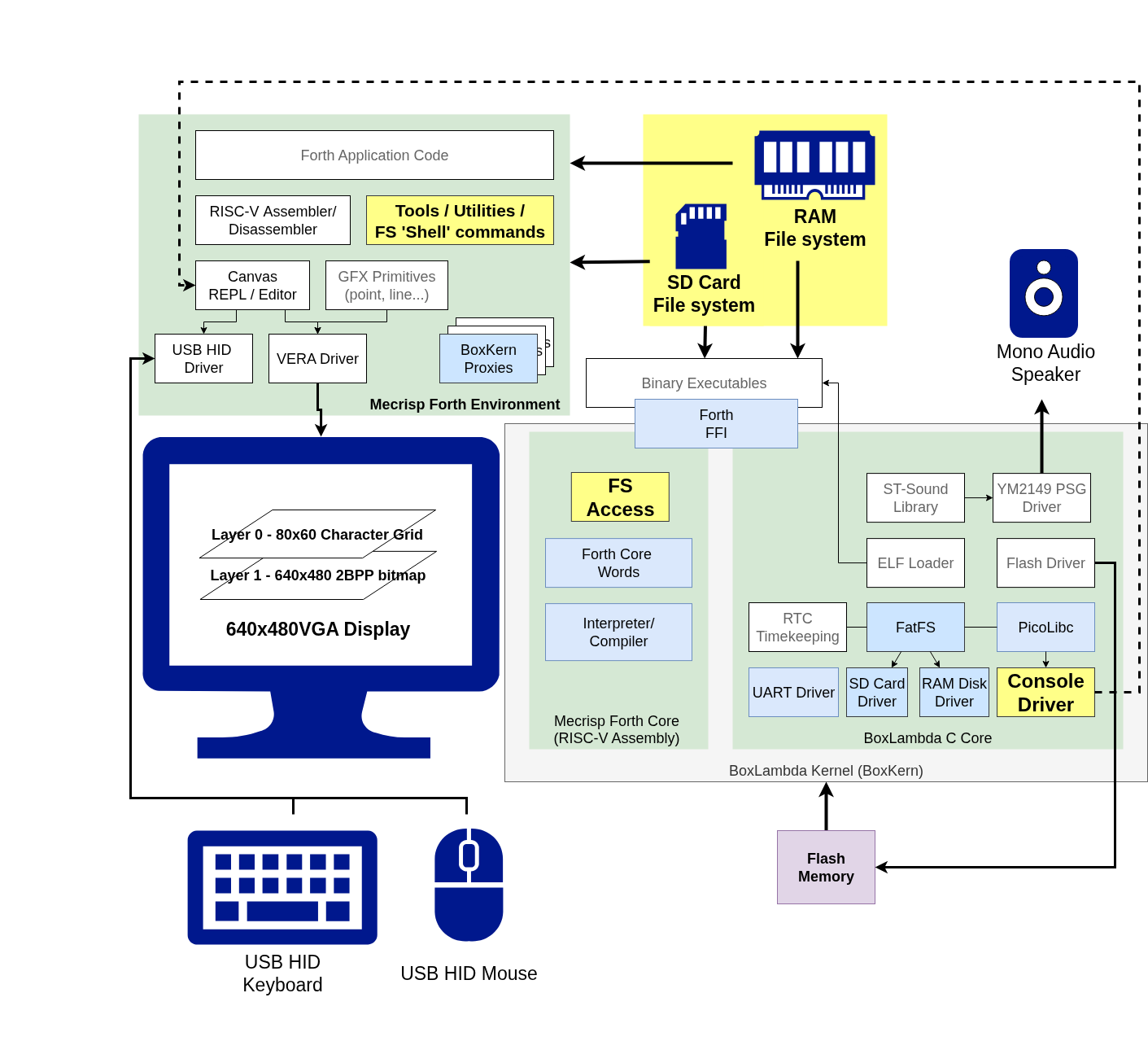
BoxLambda OS Architecture. Click to zoom.
This post specifically focuses on the yellow boxes.
For a broader overview of BoxLambda’s goals and current feature set, see the About page.
File System Access Words
BoxLambda’s Forth file system implementation is inspired by Spyren’s Mecrisp Cube project. While I did not reuse the Mecrisp Cube codebase directly, I adopted several of its core architectural concepts, including:
- A Forth File System API: Acting as a proxy for the FatFS C API.
- Standard Output Redirection: For seamlessly directing output to files.
- Shell Commands: Providing a familiar interface for interactive use.
The following examples demonstrate the API’s syntax and capabilities:
File Open, Write, Read, Close
#256 buffer: fs-buf

[: s" fs_test.txt" FA_CREATE_ALWAYS FA_WRITE or f_open ;]
try ?except_error ( fil )
dup [: s" Hello World!" f_write ;] try ?except_error ( fil nbw )
\ 12 bytes written
#12 = ?assert ( fil )

[: s" fs_test.txt" FA_OPEN_EXISTING FA_READ or f_open ;]
try ?except_error ( fil )
dup [: fs-buf #256 f_read ;] try ?except_error ( fil numbytes )
dup #12 = ?assert ( fil numbytes )
fs-buf swap ( fil fs-buf len )
s" Hello World!" compare ?assert
[: f_close ;] try ?except_error ( )
The [: .. ;] blocks represent lambdas (anonymous functions). In these examples, they define the scope of an exception-handling try block. For further details, refer to the Lambdas and Exception Handling sections below.
Directory Operations
[: f_getcwd ;] try ?except_error type cr
[: s" test_dir" f_mkdir ;] try ?except_error
[: s" test_dir" f_chdir ;] try ?except_error
[: s" .." f_chdir ;] try ?except_error
[: s" test_dir" f_unlink ;] try ?except_error
Iterating over Glob Matches
To process multiple files, you can use a glob pattern. The glob-each word takes a pattern and a lambda, executing the lambda for every matching entry found in the directory:
  s" ./*.txt"
  [: ( patha pathl )
      basename ( basea basel )
      filinfo.fattrib fattrib>str
      filinfo.getftime time>str
      filinfo.getfdate date>str
      filinfo.fsize
      s" %08n %s %s %s %s" printf cr ( dir )
  ;] ( pata patl xt )
  glob-each
Redirecting Standard Output to a File
You can easily capture output that would normally go to the console and redirect it to a file using the >file Word:
[: ." fs-redirection test" cr ;] >file redirout.txt
Shell Commands
The examples above demonstrate the programmatic use of the File System Access Words—ideal for compiled code, but somewhat cumbersome for interactive use. To bridge this gap, shell.fs provides a set of Words designed for the REPL, giving the Forth environment the feel of a (bare-bones) OS shell:
sd0:/> ls *

00000000 2026/04/06 22:24:16 --- --- --- --- DIR --- forth
00000000 2026/04/06 22:24:18 --- --- --- --- DIR --- test

sd0:/> cd forth

sd0:/forth> ls *
...
00000490 2026/03/31 17:31:56 --- --- --- --- --- ARC irq.fs
00001137 2026/03/31 17:32:52 --- --- --- --- --- ARC boxkern-includes.fs
00001749 2026/03/31 17:33:42 --- --- --- --- --- ARC utils.fs
00000328 2026/03/31 17:35:02 --- --- --- --- --- ARC early.fs
00001219 2026/04/06 20:34:52 --- --- --- --- --- ARC init.fs

sd0:/forth> cat irq.fs

\ Setting the MTIMER Comparator
: set-raw-time-cmp ( u -- ) s>d mtime64 d+ mtimecmp64! ;

\ IRQ ID constants
16 constant irq-id-fast-0
7 constant irq-id-timer
13 irq-id-fast-0 + constant irq-id-vera
12 irq-id-fast-0 + constant irq-id-vs00
08 irq-id-fast-0 + constant irq-id-dfx
10 irq-id-fast-0 + constant irq-id-sdpsi
08 irq-id-fast-0 + constant irq-id-usb-hid-1
07 irq-id-fast-0 + constant irq-id-usb-hid-0
07 irq-id-fast-0 + constant irq-id-i2c
05 irq-id-fast-0 + constant irq-id-uart

sd0:/forth>
You can find the file system Word list in the documentation here. The Words are defined in the following modules:
- fs.fs: Core file system words.
- fs-redirect.fs: Logic for I/O redirection.
- shell.fs: Interactive shell commands like
ls,cd, andcat.
The File System Stack
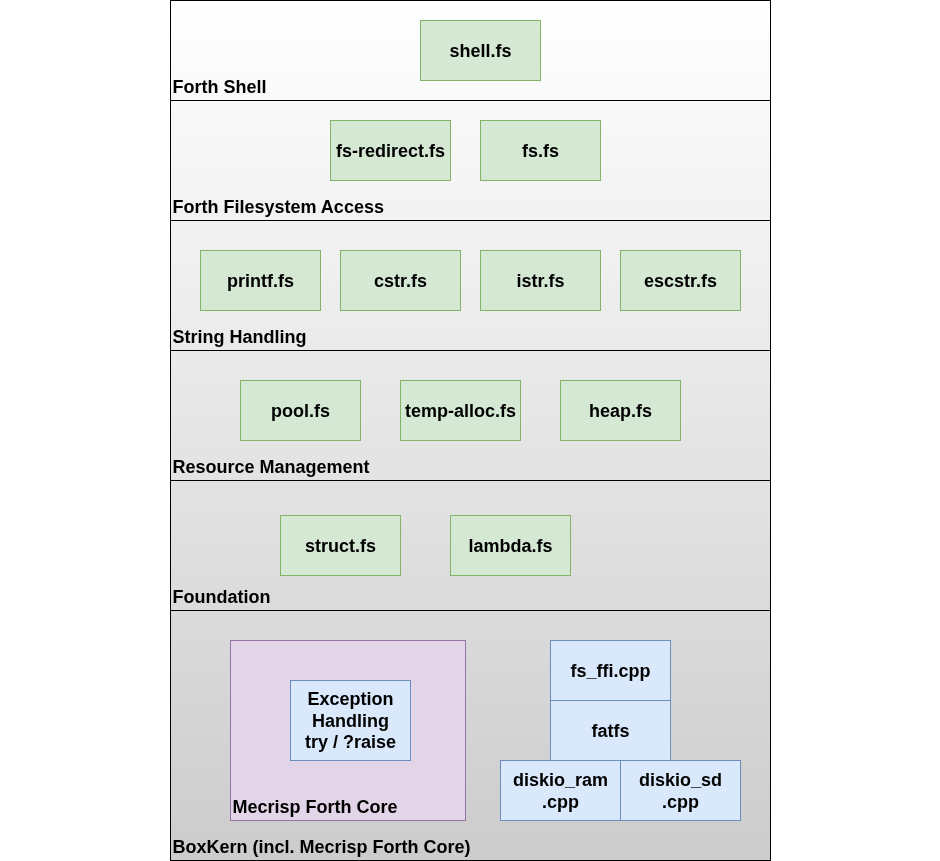
BoxLambda File System Stack. Click to zoom.
A Forth core is inherently minimalist, providing only the bare essentials. As a developer, you are expected to provide your own abstractions tailored to the specific problems you are solving. For BoxLambda’s file system and shell, these abstractions form a compact software stack. The following sections dive into each of these stacked components.
String Handling
File/Directory names and shell commands require a toolkit of string-formatting Words for ease-of-use and testability:
-
printf.fs: C-style printf/sprintf style string formatting:
basename ( basea basel ) filinfo.fattrib fattrib>str filinfo.getftime time>str filinfo.getfdate date>str filinfo.fsize s" %08n %s %s %s %s" printf cr ( dir ) - cstr.fs: Handles conversions between Forth strings and null-terminated C-strings, which is essential for interfacing with the FatFS C API in the BoxLambda kernel.
- istr.fs: By default, Mecrisp only supports compiled strings. This module provides a version of
s"that works in execution mode (interactively), which is convenient for testing the file system API on the fly. -
escstr.fs: Adds support for escaped characters within strings:
esc-s" \'Hello World\',\nForth shouted happily." type
Resource Management
Heaps and Pools
Heaps and pools simplify the implementation of interactive strings and help manage open file descriptors.
-
heap.fs: Borrowed from ZeptoForth. Provides support for creating a heap, allocating memory from it, and releasing that memory when it is no longer needed.
8 256 heap-size constant test-heap-size create test-heap test-heap-size allot 512 test-heap allocate ( addr ) ... ( addr ) test-heap free -
pool.fs: Provides a fixed-block allocator. This is ideal for managing a set of identically sized resources, such as file descriptors, ensuring efficient reuse without fragmentation.
create test-pool pool-size allot
8 test-pool init-pool

create test-pool-memory 32 allot
test-pool-memory 32 test-pool add-pool
test-pool allocate-pool ( addr )
...
( addr )
test-pool free-pool
Temporary Memory Allocation
The primary Word is with-temp-allot. In the following example, a 256-byte buffer is allocated and passed on the stack to a lambda. Once the lambda finishes execution, the buffer is automatically released:
\ cat <filename>
\ ( "filename" -- )
: cat
  cr
  token FA_OPEN_EXISTING FA_READ or f_open ( fil )
  256 [: ( fil buf )
    begin ( fil buf )
      over f_eof not while ( fil buf )
        2dup 256 f_gets ( fil buf addr len )
        type ( fil buf )
    repeat
    drop ( buf )
    f_close
  ;] with-temp-allot
;
For more granular control, temp-alloc.fs also provides a “marker” system using temp-mark>, temp-allot, and >temp-mark. This allows you to save a point in memory, perform multiple allocations, and then revert the memory state back to the saved marker in one go.
The equivalent implementation of cat using markers looks like this:
\ cat <filename>
\ ( "filename" -- )
: cat
  cr
  token FA_OPEN_EXISTING FA_READ or f_open ( fil )
  temp-mark> >r
  256 temp-allot ( fil buf )
    begin ( fil buf )
      over f_eof not while ( fil buf )
        2dup 256 f_gets ( fil buf addr len )
        type ( fil buf )
    repeat
    drop ( buf )
    f_close
  r> >temp-mark
;
Foundational Building Blocks
These modules provide basic language features that aren’t present in a bare-bones Forth core (serving as a reminder of how minimalist the Forth environment is out of the box).
Structures (ZeptoForth)
The following example defines a structure to group a file handle with a buffer and uses it to compare data between two files:
begin-structure fil-buf
  field: .fil
  field: .buf
end-structure

create fil-buf0 fil-buf allot
create fil-buf1 fil-buf allot

\ Read and compare one buffer worth of data between two open files
\ ( -- noteqf bothzerof)
: _f_cmp_buf
    fil-buf0 .fil @ fil-buf0 .buf @ 256 f_read ( len0 )
    fil-buf1 .fil @ fil-buf1 .buf @ 256 f_read ( len0 len1 )
    2dup d0= >r ( len0 len1 R: bothzero )
    fil-buf0 .buf @ -rot fil-buf1 .buf @ swap ( buf0 len0 buf1 len1 )
    compare not r> ( noteq bothzero ) ;
Lambdas - Anonymous Functions
A regular Word is created and invoked like this:
: foo <do-stuff> ; \ Define Word foo
foo \ Invoked Word foo
By contrast, a lambda is created and invoked like this:
[: <do-stuff> ;] ( xt )
execute
A lambda is a function without a name. You invoke the function by calling the execution token that’s put on
the data stack by the ;] Word.
Calling this a lambda is a stretch in the functional programming sense. True lambda functions create a closure - an enclosed environment of captured variables. That is not the case here. You get an anonymous function, but not an enclosed environment as part of the package.
Despite this limitation, lambdas are quite handy in many situations. Wherever a Word expects an execution token as input, you can provide a lambda definition inline:
Example: Exception Handling with Try
The try Word is defined as:
try ( xt1 -- xt2|0 )
It executes xt1, catching and returning any exception raised during execution. If no exception occurs, it returns 0. Using a lambda here allows you to wrap complex operations without defining a throwaway word:
[: s" fs_test.txt" FA_CREATE_ALWAYS FA_WRITE or f_open ;]
try ?except_error ( fil )
Example: Execution Mode Wrapper
This pattern also solves a common hurdle: using compile-only words (like if..then) at the REPL. You can invoke them interactively by wrapping them in a lambda:
> true [: if s" True" else s" False" then ;] execute type cr
Implementation
If you are new to Forth and find yourself wrestling with concepts like postpone, the implementation of [: and ;] is highly instructive. These words demonstrate how Forth can “weave” code by switching between compilation and execution states.
\ Begin lambda
: [: ( -- )
  state @ if
    \ [: is invoked as a compiling word, i.e. a code-generating word that
    \ executes when it's encountered in the definition of another word.
    \ When [: _executes_... it compiles an 'ahead'. This ahead pushes
    \ 2 items on the stack: patchaddr and structmatchconst
    postpone ahead ( patchaddr structmatchconst )
    \ [: puts 'here' on the stack. This the entry point of the code that 'ahead'
    \ is skipping over.
    here -rot ( lambdaentry patchaddr structmatchconst )
    \ [: compiles an 'add sp, sp -4 sw ra, (sp)', i.e. it generates a prologue.
    postpone push_ra ( lambdaentry patchaddr structmatchconst )
  else
    \ [: is invoked while in execution state.
    ] \ Enter compilation state and push following 3 items on the stack
      \ for ;] to consume.
    here 0 0 \ ( lambdaentry patchaddr structmatchconst )
    postpone push_ra
  then
  [immediate]
;

\ End lambda
: ;] ( -- )
  \ When ;] _executes_...
  postpone exit ( lambdaentry patchaddr structmatchconst ) \ ;] compiles an
                                                           \ epilogue...
  dup 0= if \ a 0 structmatchconst means that we were in execution state when
            \ [: was entered.
    \ ...compiles a switch-to-execution-state...
    postpone [ ( lambdaentry patchaddr structmatchconst)
    2drop ( lambdaentry )
  else \ an 'ahead' was compiled by [:
    postpone then ( lambdaentry ) \ ...compiles a 'then' matching the ahead
                                  \ and consuming the 2 stack items ahead
                                  \ produced...
    literal, \ ...compiles the lambda entry point as a literal.
             \ When the literal executes (i.e., when the Word invoking
             \ [:..;] in its definition executes), the lambda entrypoint is
             \ pushed onto the stack.
  then
  [immediate] [compileonly]
;
When you write … [:
       ahead
xt:    prologue
       <lambdadef>
       epilogue
       then
       xt
In essence, [: .. ;] embeds a block of code that is bypassed during the parent word’s normal execution flow, instead leaving an execution token (xt) on the stack so that the block can be called explicitly later.
Exception Handling
File system operations can return a vast array of error codes. Without a proper exception-handling mechanism, you are forced to propagate these return codes up through the entire call chain until they can be handled. This often results in “stack signature pollution,” where every Word in the chain requires an additional output parameter just for the error code.
To keep word signatures clean and logical, I prefer using exceptions:
Try executes a piece of code (a Word or a lambda). If that code encounters an error, it raises an exception using ?raise. This aborts the current operation, rewinds both the data and return stacks to their pre-try state, and returns the exception code. This allows subsequent code to catch and act on the error.
: x-test-exception ." Test exception." cr ;

[:
  [: ." Triggering exception..." ['] x-test-exception ?raise ;] try
  ?dup if ." Caught exception: " execute then
;] execute
Under the Hood: RISC-V Assembly
Try and ?raise are part of the BoxLambda Forth core. They are a RISC-V adaptation of the exception system found in ZeptoForth. The implementation is remarkably concise—about 30 lines of assembly—leveraging an ExceptionFramePointer to manage the stack state:
  Definition Flag_visible, "?raise" # ( xt|0 -- | 0 )
_raise: # Raise an exception with the exception type in the TOS register.
# -----------------------------------------------------------------------------
  beq x8, zero, 1f
  laf x14, ExceptionFramePointer
  lc x15, 0(x14)
  mv sp, x15      # Switch SP to ExceptionFrame.
  pop x15         # Get previous ExceptionFramePointer from Exception Frame.
  sc x15, 0(x14)  # Make it the current ExceptionFramePointer, i.e. restore the exception chain.
  popdouble x9 ra # Switch PSP and RA to PSP and RA stored in ExceptionFrame.
                  # This means, we'll be returning to try's caller.
  ret
1: # No exception.
  drop
  ret

# -----------------------------------------------------------------------------
  Definition Flag_visible, "try" # ( xt1 -- xt2|0 )
_try: # Try to see if an exception occurs
# -----------------------------------------------------------------------------
  push x1 # Create an ExceptionStackFrame, consisting of caller's RA,...
  push x9 # ... the PSP,...
  laf x14, ExceptionFramePointer
  lc x15, 0(x14)
  push x15 # ...and the current Exception Frame Pointer.
  sc sp, 0(x14) # Make the next Exception Frame current
  popda x15 # Call the xt on the datastack
  jalr ra, x15
  laf x14, ExceptionFramePointer # If we returned here, no exception occurred.
  pop x15 # This and the next two pops remove the created ExceptionStackFrame.
  sc x15, 0(x14) # Restore previous ExceptionFramePointer.
  pop x0 # Pop and discard the exception frame's saved PSP.
  pushda x0 # TOS=0
  pop x1
  ret
Visualizing the Flow
The following diagram illustrates the Word foo successfully “trying” bar when no exception is raised:
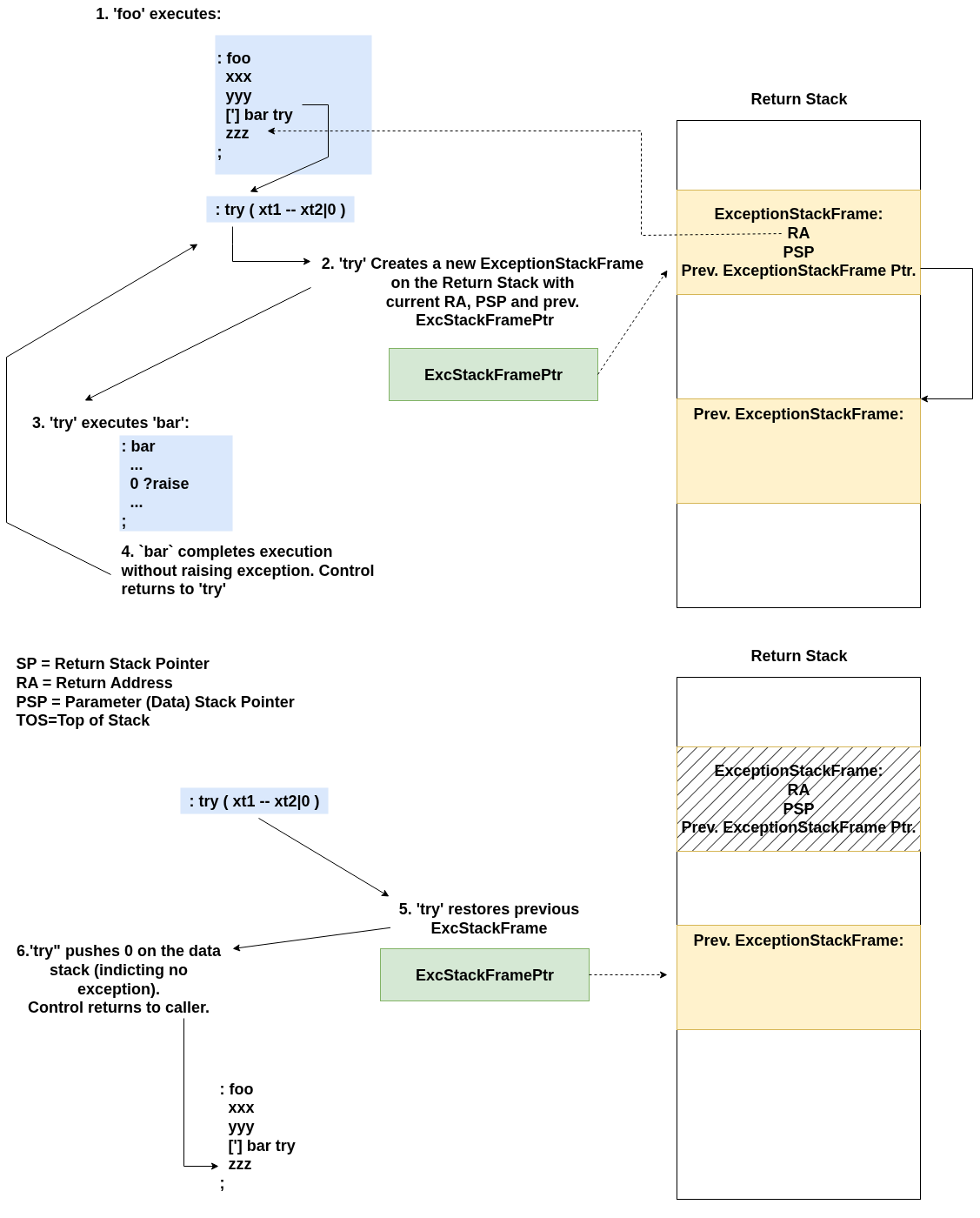
Foo Successfully tries bar.
In the next diagram, bar raises an exception called x-y-z. Notice how the execution skips the remaining logic in bar and jumps back to the handler in foo:
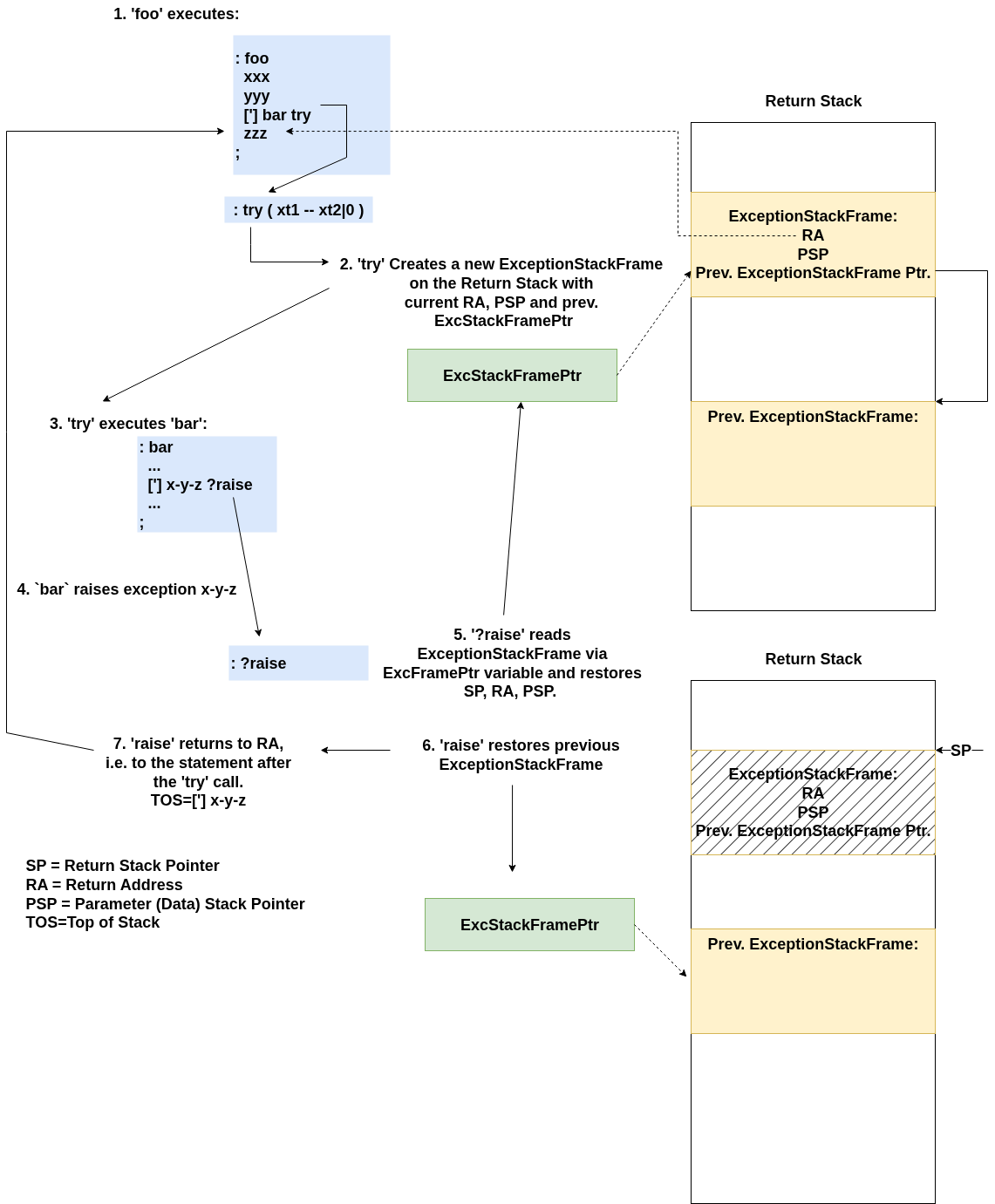
Foo tries bar, with exception.
Top-Level Safety
Raising an exception outside of a try-block would jump to an undefined state. To prevent this, the top-level REPL (the quit loop) is itself wrapped in a try-block, ensuring the system remains stable even when an interactive command fails.
Caveat
When an exception is raised, the data and return stacks are restored to their exact state at the moment the <xt> try statement was called. Consequently, any code within a try block that might throw an exception should avoid manipulating data stack items that existed before the block began.
Consider the following example:
: x-y-z ." x-y-z exception raised." cr;

: double-it ( n -- n')
  2*
  ['] x-y-z ?raise
;

: foo ( -- n )
    3
    [: dup double-it ;] try ( n exception-xt )
    drop ( n )
;

: bar ( -- n )
    3 dup
    [: double-it ;] try ( n exception-xt )
    drop ( n )
;

foo . cr
bar . cr
Foo . cr will print the value 3. However, bar . cr will print the value 6 because in bar’s case, double-it reaches outside of the data stack frame restored by ?raise.
The File System FFI
The FatFS Foreign Function Interface (FFI) follows the integration pattern discussed in my previous post on Forth and C interfacing.
The C-side wrapper handles the transition by popping arguments from the Forth data stack, invoking the FatFS library function, and pushing the result back onto the stack. Here is the FFI binding for f_open:
// File Access:
// 1. Pop input arguments of the stack
// 2. Invoked FATFS function
// 3. Push output arguments on the stack

void fs_f_open() {
  BYTE mode = (BYTE)forth_popda();
  const TCHAR *path = (const TCHAR *)forth_popda();
  FIL *fp = (FIL *)forth_popda();

  FRESULT res = f_open(fp, path, mode);

  forth_pushda(res);
}

forth_register_cfun(fs_f_open, "fs_f_open");
On the Forth side, f_open acts as a high-level wrapper around fs_f_open. It handles the necessary plumbing—allocating a file descriptor from the pool and converting the path string—while ensuring that any errors returned by the C function are immediately converted into Forth exceptions:
\ Open the file specified in input string.
\ May throw x-fr-* and x-pool-* exceptions.
\ ( addr len mode -- fil )
: f_open
  -rot path str>path ( mode )
  file-pool allocate-pool >r ( mode )
  r@ path rot ( fil path mode )
  fs_f_open ( ior )
  ?dup if ( ior )
    r@ file-pool free-pool ( ior )
    check-throw-ior ( )
  then ( )
  r> ( fil )
;
Include
The ability to load and execute Forth modules from the file system is fundamental to the BoxLambda OS. The following fragment from init.fs illustrates this in action:
include /forth/ifdef.fs

include /forth/disasm.fs
include /forth/dump.fs
include /forth/dict.fs

\ This flag is set when building the boxkerntest target.
[ifdef] FORTH_CORE_TEST
false include-verbose !
include /test/testsuite.fs
[then]
Implementing the include Word was a high priority early in the project. It enables a self-hosted development workflow: I can create and modify Forth source files directly on the target hardware without needing to recompile the BoxLambda kernel.
The following diagram illustrates the internal process of the include word:
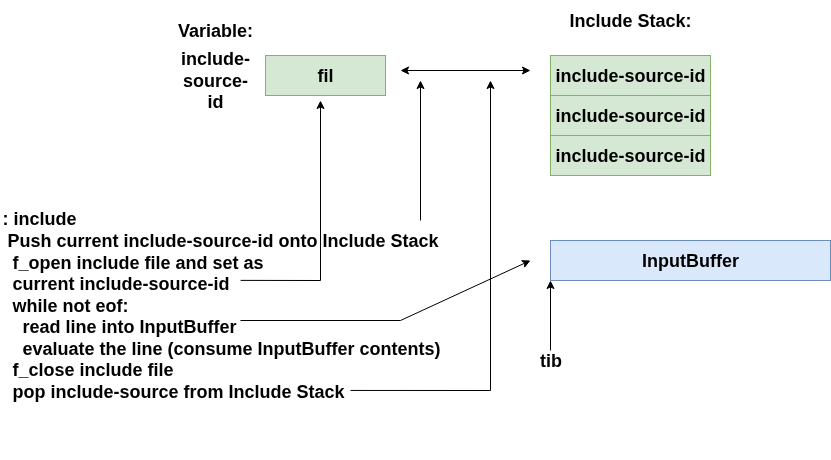
Forth Include File Evaluation.
The BoxKern-Includes Mechanism
To break the “chicken and egg” problem of loading the file system stack using a Word (include) that hasn’t been defined yet, I implemented the BoxKern-Includes mechanism.
This is fs/forth/boxkern-includes.fs:
\ This may look like a Forth module but it's not.
...
\ The order is important. The modules build up a stack, with shell.fs on top.
boxkern_include forth/units.fs
boxkern_include forth/utils.fs
boxkern_include forth/range.fs
boxkern_include forth/array.fs
boxkern_include forth/except.fs
boxkern_include forth/lambda.fs
boxkern_include forth/struct.fs
boxkern_include forth/heap.fs
boxkern_include forth/pool.fs
boxkern_include forth/temp-alloc.fs
boxkern_include forth/istr.fs
boxkern_include forth/escstr.fs
boxkern_include forth/tonumber.fs
boxkern_include forth/printf.fs
boxkern_include forth/cstr.fs
boxkern_include forth/fs.fs
boxkern_include forth/fs-redirect.fs
boxkern_include forth/shell.fs
While boxkern-includes.fs uses an .fs extension, it is technically a configuration file with a very restricted syntax:
-
Lines starting with
\are ignored. -
Lines beginning with
boxkern_includespecify the full path of a Forth module to be evaluated. -
Constraint: Modules loaded this way must not contain nested include calls.
The BoxLambda kernel processes this file during the boot sequence via the C function forth_eval_boxkern_includes_or_die(). By parsing this list and passing the contents of each file to the Forth environment, the kernel bootstraps the system layer by layer.
The order of these files is critical; each module provides the foundational words required by the next. Once shell.fs is loaded at the top of this stack, the system finally has the full interactive capabilities and the standard include word needed for normal operations.
The RAM Disk and Target.py
Since BoxLambda doesn’t yet have a native text editor, Forth modules are developed on a host PC and transferred to the target. To make this process efficient, I implemented a RAM disk on BoxLambda that can be updated via external JTAG access.
This setup allows for a high-speed “edit-transfer-test” cycle. I can modify a Forth word on my PC and have the updated module running on the FPGA in seconds, without ever touching an SD card or re-flashing the kernel.
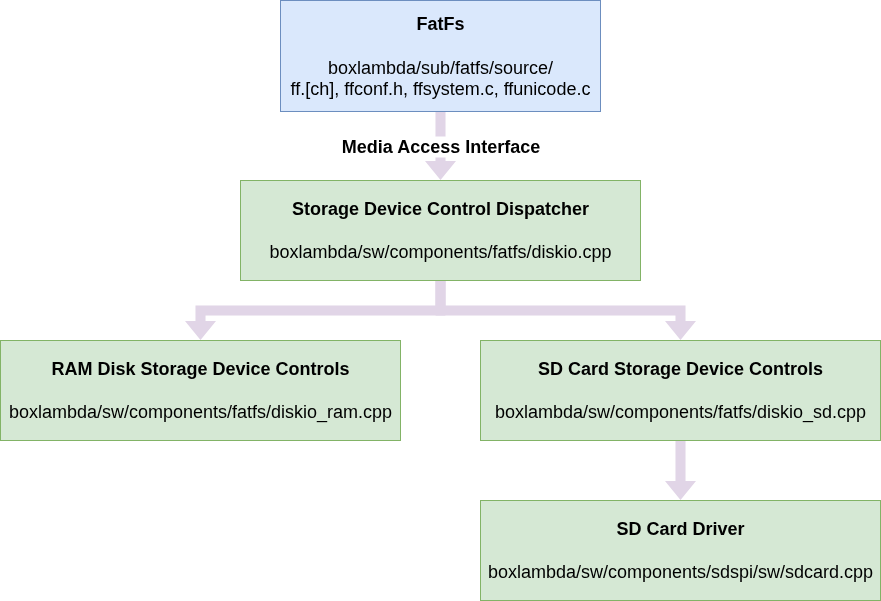
FatFs Media Access Interface.
RAM Disk Implementation
The diskio_ram.cpp module serves as the RAM Disk Device Controller, plugging into the FatFS component via its Media Access Interface. It treats a specific memory region as a disk; the BoxLambda kernel configures the external memory region at 0x2ff00000 - 0x30000000 (size: 1MB) for this purpose.
The Host-to-Target Workflow
Because the RAM disk is just a region of memory, we can bypass the BoxLambda OS entirely for file transfers using a host-side script called target.py. This tool acts as a wrapper around OpenOCD and mcopy, streamlining the transfer process:
-
Format Locally:
target.pycreates a FAT file system image on the host and populates it with the desired Forth modules. -
Transfer via JTAG: It uses OpenOCD to write that image directly into the BoxLambda memory at address
0x2ff00000. -
Mount on Target: On the BoxLambda side, FatFS detects the valid file system structure and mounts it as the
ram:drive.
The Edit-Transfer-Test Cycle
Here is a practical example of creating a hello-world.fs module and transferring it to the target.
- On the Host: Navigate to the repository’s
fs/testdirectory and create the Forth module:
  $ cd fs/test
  fs/test$ echo ": hello-world .\" Hello World.\" cr ;" > hello-world.fs
- The Transfer: Upload the contents of the
fs/directory (including your new file) to the target memory as a RAM disk image:
  /fs/test$ cd ../..
  $ target.py -load_fs fs
  === Target Control ===
  Uploading dir as RAM disk: fs
  ...
  Loading Filesystem image...
  Done.
- On the Target: Switch to the RAM drive, include the file, and run the new Word:
  sd0:/forth> chdrv ram:

  ram:/> cd test

  ram:/test> ls *
  ...
  00000036 2026/04/21 19:33:52 --- --- --- --- --- ARC hello-world.fs
  ...
  ram:/test> include hello-world.fs

  ram:/test> hello-world
  Hello World.

  ram:/test>
Target.py is a versatile tool that handles more than just file transfers. For a complete description of its capabilities, check the official documentation.
The Target File System Tree
The fs/ directory in the Boxlambda repository is the root of the target file system. Its structure will evolve over time, but it currently contains two primary directories:
-
forth/: Contains the system’s*.fsForth modules. -
test/: Contains test files used by the Forth test suite.
The JTAG transfer shown above is the fastest way to iterate, but you can also copy the fs/ directory to a physical microSD card. Once inserted, you can reboot BoxLambda to load the system from the SD card (see the installation guide for details).
Other Changes
-
The
refillWord: I introducedrefillas a more flexible alternative toquery. Unlikequery, which is strictly for console input,refillsupports input from files by checking theinclude-source-idvariable. If the ID is 0, it defaults to console input; otherwise, it pulls from the active file. This is a critical building block for implementing conditional compilation words like if/ifdef/else/endif, which are essential for managing complex module evaluations during an include operation. -
Documentation Integration: The BoxLambda ReadTheDocs documentation formerly lived in a separate branch. I have moved it into the main develop/master branch so that the documentation co-exists directly with the source code. This makes cross-referencing much simpler via relative paths and ensures that the documentation and the codebase remain in sync as the project evolves.
Acknowledgements
- ZeptoForth: ZeptoForth is a true Forth treasure chest. I am shamelessly borrowing code and patterns from this project left and right; it is my primary learning resource for Forth at the moment.
- MecrispCube: The FFI implementation, the shell-like words, and the Forth file-system API are all heavily inspired by ideas I picked up from the Mecrisp Cube project.
- Mecrisp Quintus: The Forth core at the heart of it all.
- W. Shepherd Pitts provided useful feedback on my old JTAG and OpenOCD post. Our exchange made me realize that my approach to cross-referencing between the blog, documentation, and source code was flawed. This in turn resulted in a major restructuring of the blog and documentation pages.
Conclusion
With a Forth interpreter-compiler, a file system, and a shell, BoxLambda OS is starting to function as a standalone OS. The system is becoming less dependent on the host PC and cross-compiler toolchain, moving toward a self-hosted environment where the system can be extended and maintained from within.
Next steps
-
Fast boot: Currently, the system compiles itself from source every time it boots from the file system. While this offers incredible flexibility—allowing for direct code changes on the disk without a rebuild—it is relatively slow. Even with the current modest set of Forth modules, boot-up takes several seconds. I will be exploring methods to improve this, such as committing the compiled Forth dictionary to disk and loading it as a binary image at boot time.
-
VERA graphics driver: My next major task is to develop a Forth module for the VERA Graphics subsystem. This will serve as a foundational building block for the envisioned Canvas REPL/Editor.
The File System Stack provides the infrastructure needed to manage the project more effectively. Now it’s time to start building out the drivers and tools that sit on top of it.
Thanks for reading!